


Indian Bank Balance Check Number via Missed Call, SMS, UPI & More
Checking your Indian Bank account balance takes less than a minute - no branch visit, no waiting. Regularly checking your bank balance is a good financial practice because it allows you to track your spending habits. You can check your bank balance in several ways as an Indian Bank customer.
Table of Contents
- Methods for Verifying an Indian Bank Account
- The following are the toll-free numbers for Indian Bank to check your account balance:
- 1. Indian Bank Account Balance Check via Toll-Free Number
- 2. Indian Bank Account Balance Check via the Missed Call Service
- 3. Indian Bank Account Balance Check through SMS Service
- 4. Indian Bank Account Balance Check through Net Banking
- 5. Indian Bank Account Balance Check at an ATM
- 6.How to Check Indian Bank Account Balance via a UPI App
- 7.How to Check Indian Bank Account Balance via Whatsapp?
- 8.How to Check Indian Bank Account Balance via Bank?
- 9.Indian Bank Balance Inquiry Through Email
- 10.Indian Bank Balance Check Through Official Bank App
Note :- Before you begin make sure your mobile number is registered with Indian Bank. Most digital balance check methods - missed call, SMS, WhatsApp, and UPI — require a registered mobile number to work.
Methods for Verifying an Indian Bank Account
Here are the different methods to verify an Indian Bank account:
- The toll-free Indian Bank balance check number is 1800 4250 0000
- Call Missed: 96776 33000
- SMS: Text 94443 94443
- WhatsApp: 87544 24242 to say "hi"
- Net Banking: Open the Indian Bank Net Banking website and log in
- Get the IndOASIS app for mobile banking
- USSD Code: Enter \*99\*58#
The following are the toll-free numbers for Indian Bank to check your account balance:
Function | USSD Code/SMS |
Indian Bank Toll-Free Number | 1800 4250 0000 |
SMS | 94443-94443 |
Missed Call | 8108781085 |
Additio of the phone banking facilities (via the missed call and SMS service) to check their account balance.
1. Indian Bank Account Balance Check via Toll-Free Number
The easiest method to check your bank balance is via toll- free number.
Follow the steps given below:
- Use your registered phone number to call the toll-free number 1800 4250 0000
- Choose your preferred language from the available options
- A customer service representative will answer the phone and assist you in checking your bank balance
- Make sure you have your customer ID and account number on hand.
2. Indian Bank Account Balance Check via the Missed Call Service
If the customer has registered their mobile number with their Indian Bank savings account, they can use the missed call service to check their balance. To utilize this service, follow the steps below:
Step 1: Ensure that your mobile number is registered with Indian Bank.
Step 2: Following the registration, the customer has to call Indian Bank at: 9677633000
Step 3: The call will automatically disconnect after 1–2 rings, and you will receive an SMS with your account balance details.
Note: Indian Bank Customers does not charge any fees for balance enquiry via Missed call.
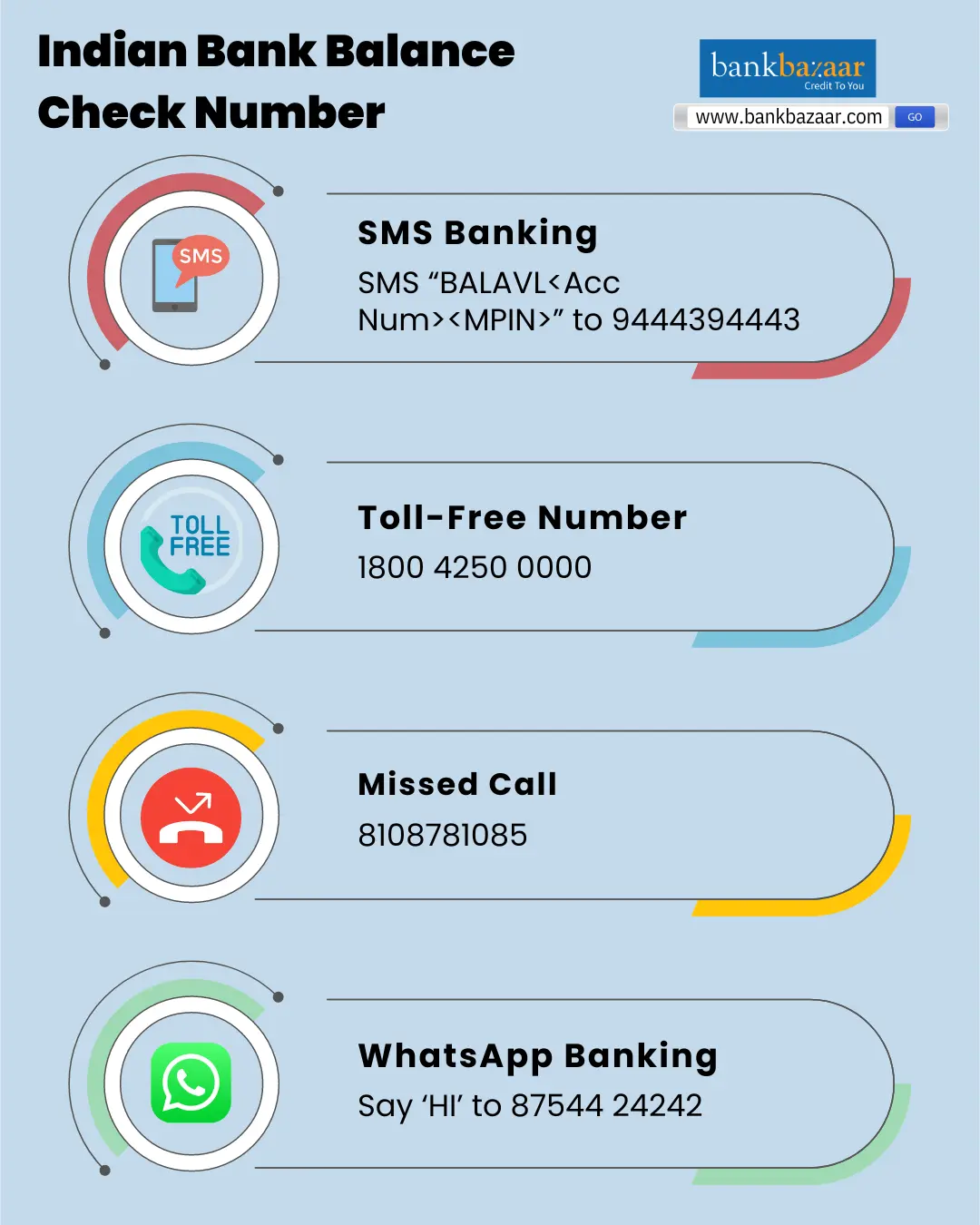
3. Indian Bank Account Balance Check through SMS Service
To check Indian Bank account balance vis SMS, you must follow the steps given below:
Type of Request | SMS Code | SMS Format |
Regular Balance Enquiry | BALAVL | BALAVL <Ac no>MPIN |
Mini Statement | LATRAN | LATRAN <Ac no> <MPIN>LATRAN <MPIN> |
To Check Status of Cheque | CHQSTS | CHQSTS chq no <Ac no> MPIN CHQSTS <chq no> MPIN |
To Check Status of Deposited Cheque | DCHSTS | DCHSTS chq no <Ac no> MPIN DCHSTS <chq no> MPIN |
To Change Mobile Banking PIN | CHGPIN | CHGPIN New MPIN OMPIN |
For any Bank Related Query | HELP | HELP Code MPIN |
a. Via SMS Requests with Keywords
For SMS services, the Indian bank balance check number is:
The message must be sent in the format <BALAVL><space><Account Number><space><MPIN>. Your bank account information will be sent to you via SMS on the same number.
b. Through Automated SMS Updates
Your registered mobile number receives an automated SMS each time a transaction is made to or from your account. You may monitor the balance of your Indian Bank account using the SMS.
4. Indian Bank Account Balance Check through Net Banking
For customers that have an internet banking account with Indian Bank, they can follow the steps mentioned below to check their account balance.
- Enter your login information to access the official Indian Bank online banking platform. For your account to be able to accomplish this, online banking must be enabled
- A "Balance Enquiry" option will appear on your dashboard. Click on it and enter the essential data, including the OTP if needed
- Your bank balance will be visible on your device. If your account does not have internet banking enabled, you can get in touch with the branch that is nearest to you.
5. Indian Bank Account Balance Check at an ATM
Indian Bank customers can also check their account balance at an ATM of their choice. Customers need to follow the steps mentioned below to do so.
Step 1: Visit an ATM closest to you.
Step 2: At the ATM, insert your Indian Bank debit card
Step 3: Enter the 4-digit Indian Bank ATM PIN
Step 4: Click on 'Balance Enquiry'.
Step 5: The ATM will then display the balance in your account.
6.How to Check Indian Bank Account Balance via a UPI App
Given below are the steps to know Indian Bank account balance via a UPI app:
- Open your preferred UPI app and select "Balance Check" or your profile
- Your balance will flash on your screen after you enter your 4-digit UPI PIN
- Typical UPI apps that can be utilized for this purpose include:
- Free charge
- Pay with Amazon
- Google Pay
- PhonePe
- CRED
- Finserv Bajaj
- Samsung Pay
7.How to Check Indian Bank Account Balance via Whatsapp?
Given below are the steps to know Indian Bank account balance via Whatsapp:
Step 1: Save the number 8754424242 on your smartphone.
Step 2: Send a “Hi” on this number through your registered mobile number.
Step 3: A message containing the list of services being offered with each number assigned will be sent to you.
Step 4: Reply with the assigned number, usually “1”.
Step 5: You will immediately be notified about your account balance.
8.How to Check Indian Bank Account Balance via Bank?
You can choose to visit the bank office to find out your balance if the online methods or the Indian Bank balance check number don't work for you. You can visit the bank in two ways to find out your balance:
1. Ask the Counter for Balance Information
You can go to the bank and ask the person working there to tell you about your balance; they will look up your balance and transaction information for you. For this, you might need to bring your account number and a valid ID.
2. Passbook Updates
Updating your passbook is another way to determine your balance. The actions listed below must be taken:
- Go to the Indian Bank Passbook Vending Machine
- To enable the gadget to scan the barcode, place your passbook in the slot in the proper orientation
- The passbook begins to print. After filling out a page, take the passbook out and move on to the next one
- Continue doing this until your ultimate balance is known, and the passbook is entirely updated.
9.Indian Bank Balance Inquiry Through Email
One of the less well-known ways to check your Indian bank balance is this one. Simply send an email with your registered email address to find out your bank balance. The email should be sent to rtgs@indian-bank.com. After that, the bank will inform you of your balance or, if necessary, ask you to follow any additional instructions.
10.Indian Bank Balance Check Through Official Bank App
The Indian Bank's official banking app, IndOASIS, may be downloaded from the Play Store and Apple Store. To check your bank balance via the bank's app, follow these steps:
- Enter your login information to access your account
- Following verification, your dashboard will open
- To view the available bank balance, click "My Account." Your screen will display it
- To authenticate yourself the first time you use the app, you will need your debit card information.
USSD Codes for Indian Bank Balance Verification
You can use USSD codes to check your account balance even if your phone is not connected to the internet. To view your account balance on your screen, simply dial \*99\*58#.Check Your Credit Score for FREE


FAQs on To Check Indian Bank Account Balance
- Will I be charged to check Indian Bank account balance?
No, you will not be charged to check Indian Bank account balance.
- Can I check my account balance at any ATM?
Yes, you can check your balance at any bank’s ATM using your debit card, subject to free transaction limits.
- Is it safe to check account balance through UPI?
Yes, it is safe to check account balance through UPI. However, do note that you should not share your UPI password with anyone.
- Can I visit the bank and check my account balance?
Yes, you can visit the bank and check your account balance.
- How many times can I check my account balance?
You can check your account balance any number of times.
- How can I receive my mini statement from Indian Bank by SMS?
Send an SMS with the format to 9444394443 to generate your mini statement. You can send an SMS with simply the past three transactions from your default account.
- How can I activate mobile banking with Indian Bank?
To activate mobile banking services, get in touch with the Indian Bank branch that is closest to you.
- How can I check the last three transactions in an Indian bank?
You must generate the MPIN after logging into your Indian Bank app with your bank account details. To view your past three transactions, you must then log in to the program with your User ID and MPIN and choose the "Mini Statement" option from the on-screen menu.
- How can I check the balance on my Indian bank account?
Sending an SMS is one of the simplest and quickest ways to check the balance of your Indian bank account. Simply text the number 9444394443 in this way.

Karishma VP has over a decade of experience in content writing which includes over five years specializing in personal finance. Her career in BankBazaar has given her the opportunity to write on a wide variety of financial products ranging from credit cards and home loans to insurance policies and government schemes. She believes that an understanding of personal finance is an important step to leading an independent, empowered life. This has led to her being passionate about learning more about the BFSI sector and writing about personal finance as clearly, concisely, and accurately as possible to make it accessible to a larger audience through BankBazaar.

Disclaimer
Credit Card:
Credit Score:
Personal Loan:
Home Loan:
Fixed Deposit:


Copyright © 2026 BankBazaar.com.